
HOA board approvals before the money is spent.

Your manager reviews every quote. Small ones are approved by the manager, mid-size ones by the president or treasurer, and large ones by a board vote — and the vendor hears only when your manager releases it.
Board Portal with decisions due
01Approval rules

Every quote has a route, set by amount.

Your manager reviews every quote first. The amount, the budget fit and the association’s rules decide who approves it.

When the quote isWho approvesDefault limit
An emergencyYour manager, right away—
Within the auto-approve limit and the budget lineYour managerUp to $500
Up to the officer limitThe board president or treasurerUp to $2,500
Above the officer limitA board vote with the quorum you setMajority of active members

Limits and quorum are set per association. Association rules →

02Manager review

Nothing reaches the board, or the vendor, without your manager.

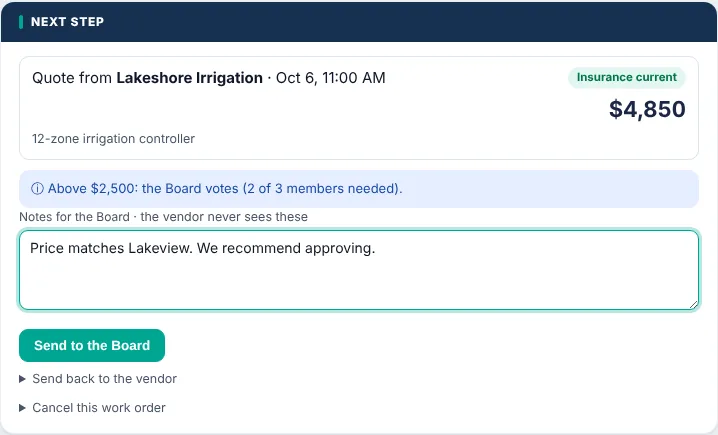
When a vendor sends a quote, or you accept a vendor estimate, the work order goes to Manager Review. The panel shows the vendor, amount, notes, insurance and related-party status, and which route applies.
  • Approve and send to vendor — within the limit or an emergency, with optional instructions the vendor sees
  • Send to the Board — with notes for the board that the vendor never sees
  • Ask for a new quote — with a reason the vendor sees
  • The wrong action for the route is refused
  • A reminder after 24 hours in review
Manager review panel: a $4,850 quote above the $2,500 officer limit, notes for the board and the Send to the Board button
Sample data
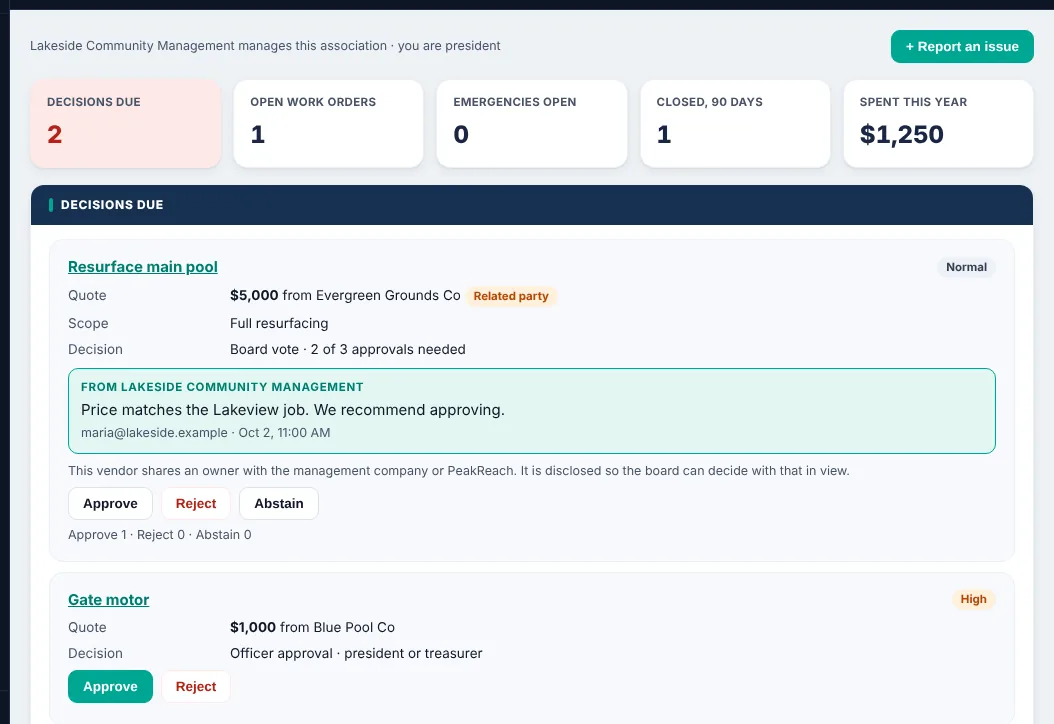
Board Portal: decisions due with the quote, scope, the management company's note, related-party disclosure and approve, reject or abstain
Sample data
03Board Portal

Board members decide from their phone.

Each decision shows the quote, the vendor, the scope, the route and your manager’s note, signed by your company.

  • Board vote: approve, reject or abstain, with the running tally; a member can change their vote while it is open
  • Officer approval: approve or reject, by the president or treasurer only
  • Related-party vendors are disclosed on every decision
  • Reminders to board members after 24 and 72 hours; your managers hear at 72 hours if the vote has not reached quorum
04Back to the manager

The board approves. Your manager tells the vendor.

An approved quote goes to Ready to Release, not straight to the vendor.
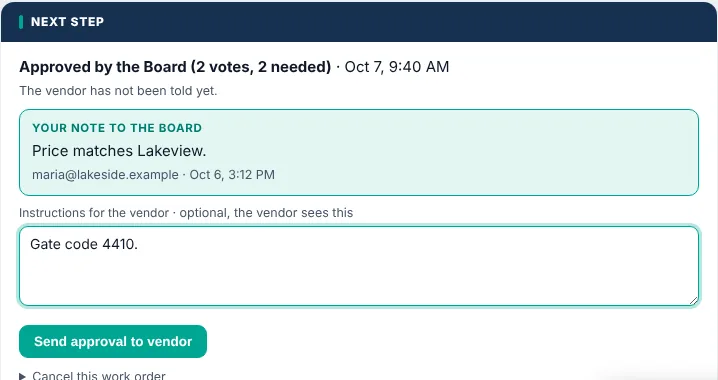
  • The panel shows who approved it and the vote count, and that the vendor has not been told yet
  • Add instructions for the vendor and Send approval to vendor
  • A reminder after 4 hours, and a count of Approved, vendor not told on the board
  • If the board rejects it, the work order returns to manager review: ask for a new quote or cancel
Ready to release: approved by the board with 2 votes, and instructions for the vendor before sending the approval
Sample data
05The rest of the Board Portal

What the board sees, and what it does not.

At a glance

  • Decisions due, open work orders, emergencies open
  • Closed in the last 90 days with final cost
  • Spent this year

Every work order

  • Stage, priority, location, category, who asked, budget fit
  • Vendor and insurance status, all quotes, each member’s vote
  • Full history and photos

Report an issue

  • What needs attention, where, priority and details
  • Sent to your managers as a new work order

Kept private

  • Homeowner names and contacts (lot address only)
  • Utility account numbers

What the vendor sees

  • One status, “Under review”, from the quote to the release
  • Never the board, the votes or anyone’s notes

On the record

  • Every forward, approval, return and release is recorded with who and when
  • Each vote is kept with the work order
Guide: HOA board approval limits — how to set manager, officer and board vote limits.Read the guide →
More of the system

One system for the whole portfolio.

See it with one of your associations.

A 30-minute walkthrough with your own approval limits and vendors — or create your account and start today.