
Vendor COI tracking that stops uninsured vendors before dispatch.

Certificates of insurance, licenses and W-9s are uploaded by the vendor and approved by your staff. A vendor without current insurance cannot be put on a job, and every job keeps the record.
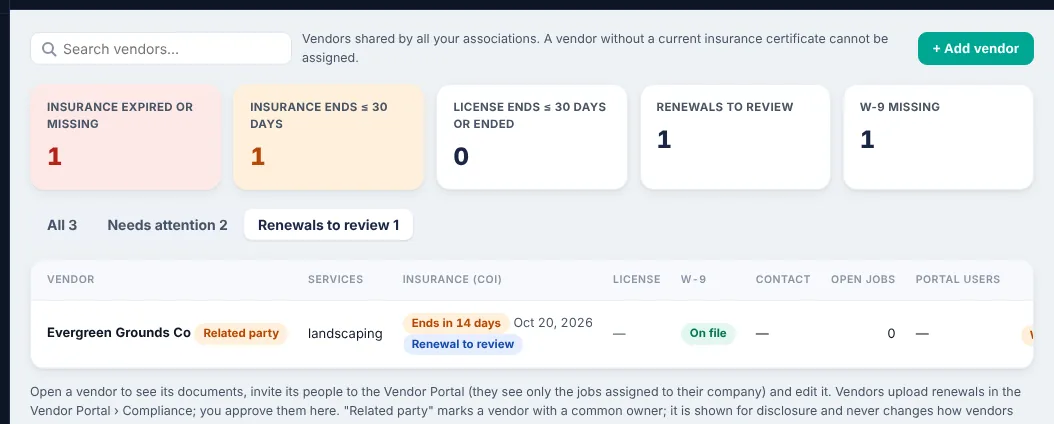
Vendor list with insurance and license status
01Vendor list

Every vendor, with their paperwork status.

Vendors are shared by all your associations. The list puts what needs attention on top.

  • Counts: insurance expired or missing, insurance ending within 30 days, license ending or ended, renewals to review, W-9 missing
  • Filters: all, needs attention, renewals to review
  • Each vendor with services, insurance, license, W-9, contact, open jobs and portal users
  • A waiting N days label on renewals not yet reviewed
  • Company details: name, services, service area, contact, W-9 on file, related party, active
Vendor list with insurance expired, ending, license, renewals to review and W-9 missing counts
Sample data
02Compliance documents

Vendors upload. Your staff approves. Dates come only from approved documents.

Insurance certificates (COI), contractor licenses and W-9s, each with its number, status and who approved it.
Upload

  • Vendors upload renewals in their portal; each waits for review
  • Your staff can upload too and it is on file at once
  • For a related-party vendor, another manager or an admin must approve — nobody approves their own upload

Review

  • The current document next to the new one, and the file
  • The reviewer confirms they checked the dates and coverage
  • Approve to use the new date, or reject with a reason
  • The vendor is emailed either way

Rejection reasons

  • Certificate holder or additional insured missing
  • Wrong insured name
  • Coverage too low
  • Unreadable or wrong document
  • Dates do not match
  • Other, with a note

Other documents

  • Workers’ comp, service contracts, business license, bond, auto insurance, safety certificates
  • Optional expiry date and note
  • Removing one keeps it in the record

The assignment rule

  • A vendor without current insurance cannot be assigned a job
  • A license only triggers reminders
  • Each work order keeps the insurance record from when the vendor was assigned, started and completed

Related parties

  • Vendors with a common owner are labelled on the list, work orders, estimates and board decisions
  • The label never changes how vendors are suggested
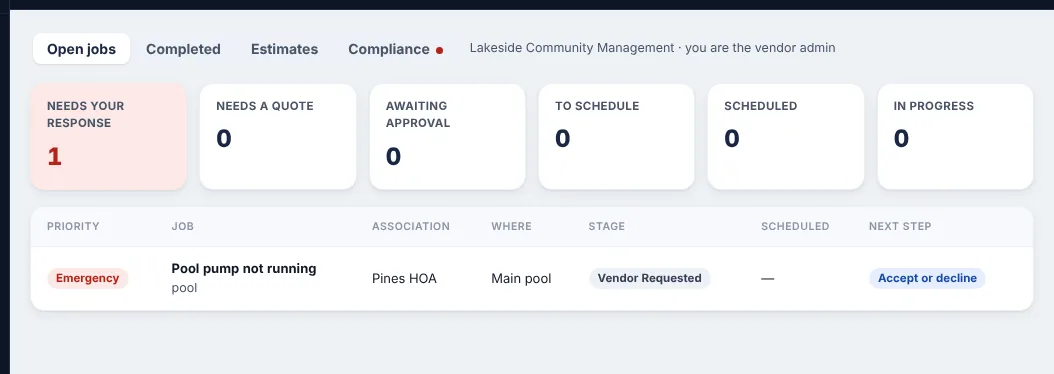
Vendor Portal: jobs needing a response, a quote, approval, scheduling, scheduled and in progress
Sample data
03Vendor Portal

Vendors run their jobs in their own portal.

Open jobs, completed jobs, estimates and compliance, with the jobs that need them first.

  • Accept or decline a job, send a quote with scope and notes
  • Schedule, start work and report completion with the final cost
  • Add photos to the job, see your instructions and the job’s history
  • Send estimates for associations they serve, answer questions, withdraw an estimate
  • Upload insurance, license, W-9 and other documents, with banners when insurance needs attention
  • Two roles: vendor admin does everything; technician starts work
04Vendor view of compliance

Vendors see exactly what is missing.

Their compliance tab shows each document, its status, why it was not accepted and what to upload next.
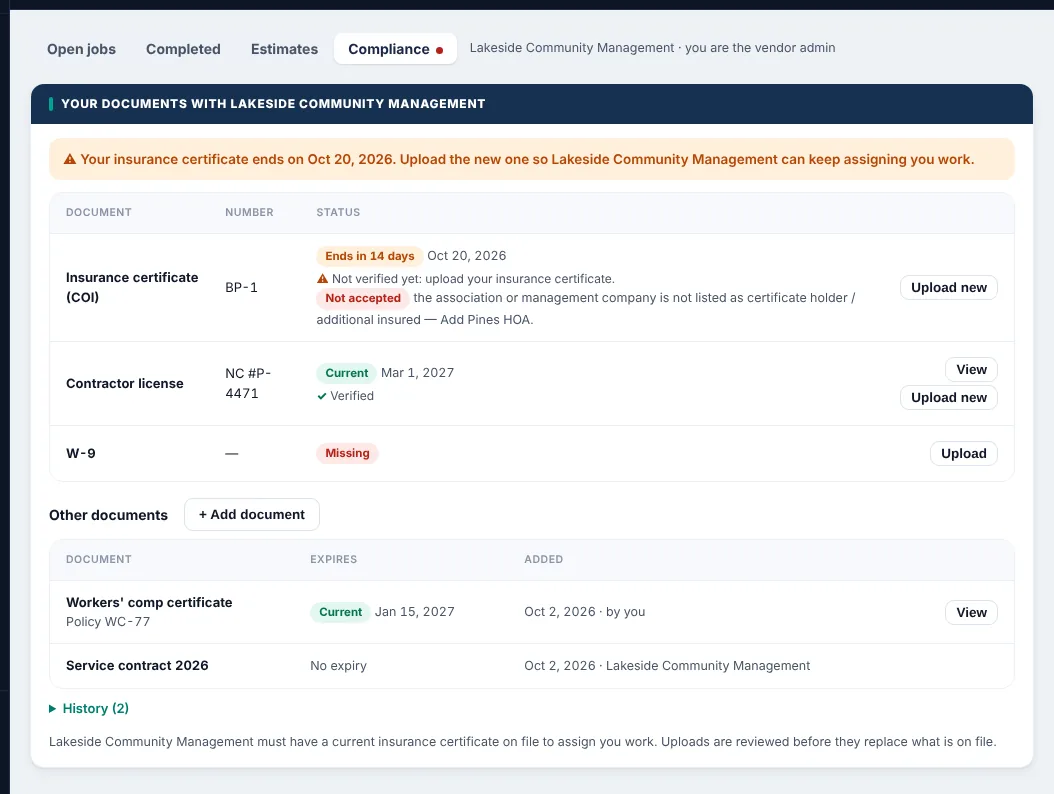
  • Expiring and missing insurance is shown before it blocks new work
  • Vendors invite their own people by email from your vendor record
  • Vendors never see homeowner names or contacts, other vendors’ jobs or quotes, the board, votes, notes or budget
Vendor Portal compliance tab: certificate ending in 14 days with the rejection reason, current license, missing W-9 and other documents
Sample data
Guide: Vendor certificate of insurance requirements for HOAs — what to check on every COI before a vendor is assigned.Read the guide →
More of the system

One system for the whole portfolio.

See it with one of your associations.

A 30-minute walkthrough with your own approval limits and vendors — or create your account and start today.