
A homeowner portal that answers “what’s happening?”

Homeowners report an issue, follow it in plain words and add photos — so your office answers fewer calls, and nobody sees what they should not.
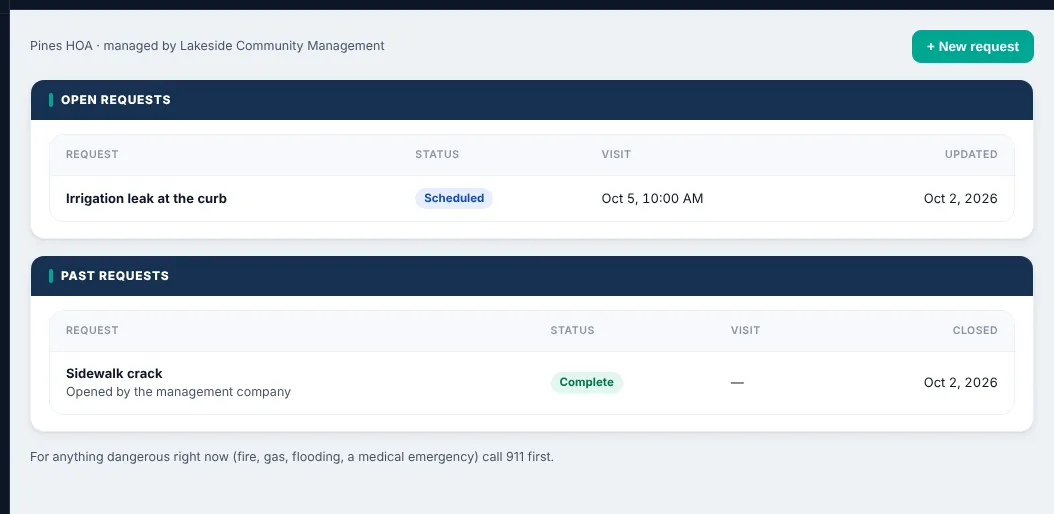
Homeowner Portal with open and past requests
01What homeowners can do

Report it once. Follow it to the end.

Report an issue

  • What needs attention and the details
  • How urgent: normal, soon (it is getting worse), or urgent (damage or a safety risk now)
  • A reminder to call 911 first for anything dangerous

Follow progress

  • Open requests with status, visit date and last update
  • A progress checklist and history of each request
  • Past requests with the date closed

Add photos

  • Before, after and other photos while the request is open
  • Stored privately with the work order
02Plain status words

Homeowners see what is happening, not your internal stages.

Your team seesThe homeowner sees
NewReceived
Under reviewUnder review
Vendor requested, vendor acceptedArranging a vendor
Quote, manager review, approvalsBeing approved
ScheduledScheduled
In progressWork in progress
CompletedWork done, being checked
Verified, closedComplete
On hold, awaiting homeowner, cancelledOn hold, needs your input, cancelled
03Private by design

Homeowners see their home. Nothing else.

Access is checked in the database on every request, not just hidden on the screen.

  • No vendor names or contacts, quotes, amounts, approvals, votes or budget
  • No internal notes
  • A new owner never sees the previous owner’s requests
  • Requests opened by your staff are labelled “Opened by the management company”
Homeowner Portal: an open irrigation request scheduled for a visit and a past sidewalk request marked complete
Sample data
04Access and updates

No app to install.

Invitation

  • Your staff invites the homeowner from the lot record
  • They set a password and sign in from a phone or computer

Updates

  • Told when the visit is scheduled, and when the request is closed or cancelled
  • By email, text message, both or none — their choice

One login, several roles

  • A homeowner who is also a board member or a vendor switches between portals in the menu
More of the system

One system for the whole portfolio.

See it with one of your associations.

A 30-minute walkthrough with your own approval limits and vendors — or create your account and start today.